


The more you work with CODEXIS AI Agent, the more conversations pile up. Four new features help you keep track of them.
Searching the content of conversations
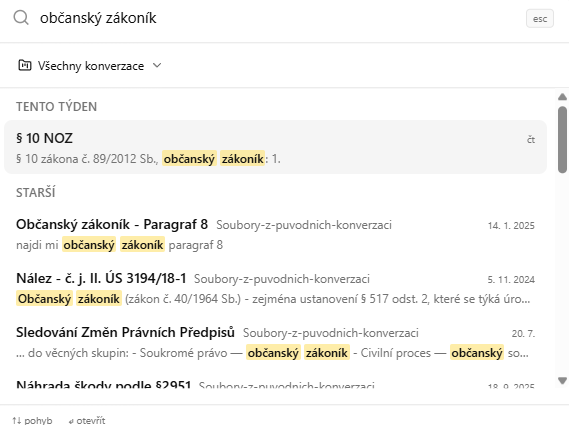
Search conversations in the left menu searches the content of all your conversations, not just their names. Each result shows the name, project, date and a text excerpt with the matched term, grouped by time. You will find a conversation even when its name has nothing to do with the term you are looking for. Narrow the search to one project with the All conversations button above the results, and when you search from an open chat, its project is preselected.
Pinned conversations in their own section
A conversation pinned with Pin conversation, which we introduced in June, no longer just stays at the top of the history. Pinned conversations have a separate section in the left panel with their own order, which does not shift according to where you last worked. Your cases in progress are always in the same place. The section appears as soon as you pin something.
A running summary of the conversation
You do not have to read a long conversation from the beginning. After every completed answer a short paragraph summarising the conversation so far is updated, and you open it with the info button in the chat header. It helps when you return to a case after a week or hand it over to a colleague.
The AI answers from the documentation
When you ask in the chat about CODEXIS AI Agent itself, for example how to set up an automation or where to find the Library, the AI answers from the official documentation at docs.codexis.ai, not from the model's general knowledge. First-line help with the product is right there in the conversation.
Search and history are described in the documentation on the History and conversation search page.