

The model and its customization
CODEXIS AI uses GPT-6.1 Sol by default. You can choose from GPT-6, Claude, Gemini and other models and customize the model settings.
CODEXIS AI uses GPT-6.1 Sol by default. Optionally, you can switch to other models from the GPT-6 family, to Claude, Gemini or other models in the picker.
You can set how concisely the chat should respond, how much it should think when answering, which processing tier to use, and also the context size.
The default setting is: low verbosity, high reasoning, standard tier, and standard context.
GPT-6 models
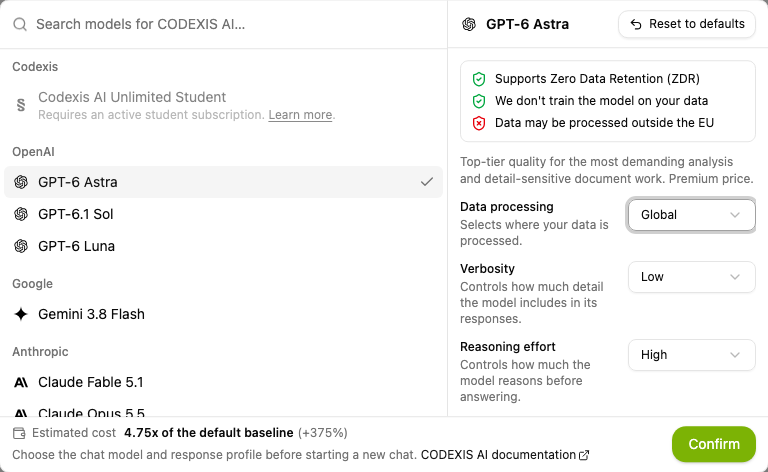
The model selection now includes the latest generation of language models from OpenAI, the GPT-6 family. The model picker lists them from the most capable to the most economical:
- GPT-6 Astra: top-tier quality for the most demanding analysis and detail-sensitive document work, at a premium price.
- GPT-6.1 Sol: strong quality for professional writing and complex analysis, at a lower cost than Astra. This is the default model.
- GPT-6 Luna: fast and very economical for large volumes of simple questions, short summaries and text processing.
All three support zero data retention and data processing in the EU, and none of them is trained on your data.
GPT-5.6 models
You may encounter the previous generation of OpenAI models, the GPT-5.6 family, in older conversations. Newer models replace it in the current picker for new conversations:
- GPT-5.6 Sol: the most capable model in the GPT-5.6 family. Reach for it in tasks where the highest possible quality and reliability of the answer is the priority.
- GPT-5.6 Terra: a balanced model combining high quality, reasonable speed and a lower price than GPT-5.6 Sol.
- GPT-5.6 Luna: the fastest and most cost-efficient model in the GPT-5.6 family. It is best suited for simpler, repetitive or high-volume tasks.
The reasoning mode (Standard, Pro) is a separate model setting. It is described in Pro reasoning mode for OpenAI models.
What can be set
The new configuration gives the user greater control over how the chat responds and how much performance and cost they want to invest in the answer.
- Verbosity determines how much the chat writes out and how concise or elaborate the answer will be.
- Reasoning effort determines how much time and energy the model devotes to thinking about the answer. The higher the level, the more it tries to find connections and put together an answer.
- The tier affects price and speed. From a slower response at half the price, through standard processing as you have known it so far, up to the highest priority processing at double the price.
- The context window size determines the maximum number of tokens the model can process at once (system instructions, user input, conversation history, and the model's response): 272 thousand tokens or 1.05 million tokens. The extra-large context is available only in the Standard tier and uses higher rates than the standard context.
Overview of the individual options
- Verbosity: low, medium, high
- Reasoning effort: low, medium, high, extra high
- Tier: Flex, Standard, Priority
- Context size: standard, extra large (Standard only)
- Reasoning mode: standard, Pro
GPT-6 and GPT-5.6 model settings
Verbosity
With the GPT-6 and GPT-5.6 models, verbosity is in practice mainly about the "conciseness" of the answer. It affects how much text the AI writes out, whether it adds more examples, and how much it elaborates on the answer. The same effect can often be achieved by a simple instruction in the prompt, for example write it out in detail or be very concise.
The options are low, medium, and high. The default setting is low.
Reasoning effort
If you know exactly what you want, low reasoning is usually enough. It is suitable, for example, for tasks like: from a specific section and another specific section, give me certain information and write something about it.
The default setting is high, which suits deeper thinking and situations where the model should draw conclusions from loosely connected documents and legal concepts. Medium is faster and cheaper and is usually enough for everyday questions. Use extra high to find obscure information, or when you are not satisfied with the answer at the high setting.
Tier
The tier mainly determines the speed of the response and the price. Flex is half the price and Priority is double the price compared to the Standard tier.
If you are not in a hurry, use Flex. You will save 50%. Keep in mind, however, that Flex may not always be available. Under high load it is deprioritized and may return errors, so it is better suited for less urgent work, ideally in the morning.
Context size
For ordinary conversations, we recommend not changing the context size. The extra-large context makes sense mainly when you are working with very extensive materials or a long conversation history.
If you want to restore the default settings, click Restore default values. Changes cannot be made in a chat that is already in progress.
Note: You can now influence credit consumption yourself. Compared to the default setting, you can reduce it by up to 64%, but at the same time, with maximalist settings, consumption can increase by up to 560%.
Example settings
- for fast and cheaper answers, use Flex + low verbosity,
- for more complex tasks, increase reasoning and possibly verbosity as well,
- for large inputs or extensive materials, use the extra-large context,