

History
Find previous conversations in CODEXIS AI history and return to requests and documents you were working on.
What it is: A list of your conversations in the left panel under the History heading. It lets you quickly return to work in progress — just click and continue where you left off.
What you'll see here:
- Conversations are sorted so that the most recent ones are right at hand (e.g. "Contract draft review", "Terms and conditions for the EU", "Lease agreement template").
- Icons next to the title indicate the type of conversation — for example an attached document or a linked automation.
- The history panel can be collapsed and expanded using the arrow next to the heading.
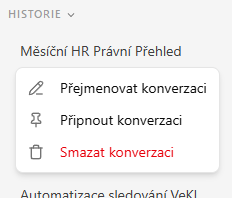
Working with a conversation: For each conversation in the history, its menu offers three actions:
- Rename conversation — change the name so you can find your way around the history more easily.
- Pin conversation — pin the conversation to the top so you always have it at hand.
- Delete conversation — remove the conversation (this action is irreversible, which is why it is highlighted in red in the menu).
💡 Tip: It pays off to rename conversations by topic (e.g. "Lease review — client X"), especially if you have a lot of them — you'll then find them much faster in the history and in search.
This manual is based on the July 2026 version of the CODEXIS AI Agent application.