

Applications
An overview of CODEXIS AI applications for ongoing monitoring of data and documents and regular reports on changes.
What it is: Applications are specialized tools for ongoing monitoring — of data, documents, or your own workflow — directly within CODEXIS AI. Unlike a one-off query, applications track a topic over time and automatically prepare regular reports on what's new.
Where to find them: In the left-hand menu under Tools → Applications.
Where they come from: Applications arrive together with installed add-ons and are displayed here grouped by source (e.g. CODEXIS — Legal Database, Land Registry of the Czech Republic).
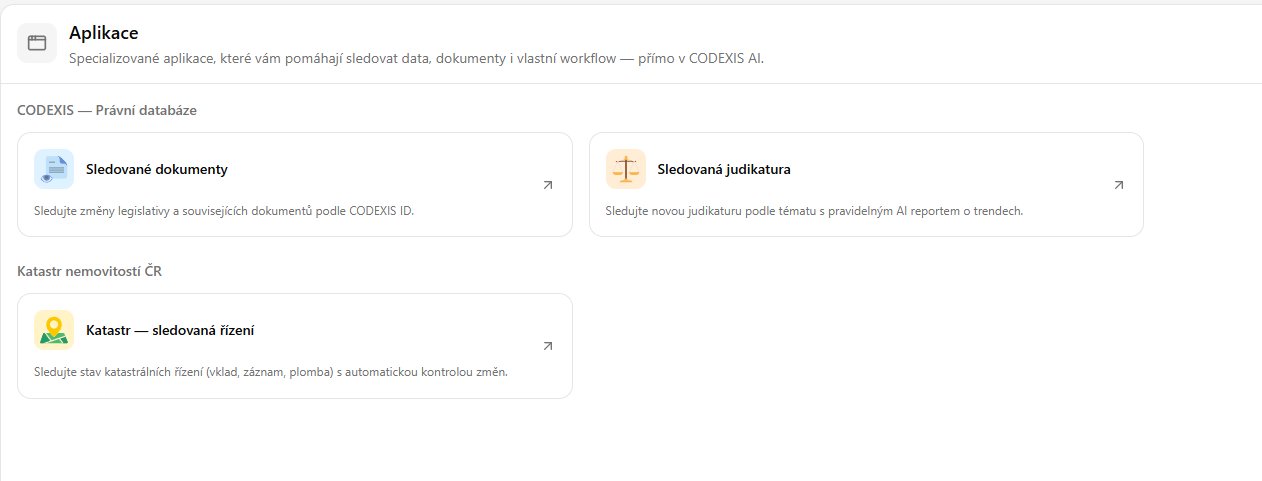
Available applications
- Monitored documents — tracks changes in legislation and related documents based on CODEXIS ID (e.g. amendments to a specific act). A detailed guide is available on a separate page.
- Monitored case law — tracks new case law on a given topic and prepares a regular AI report on trends. A detailed guide is available on a separate page.
- Land Registry — monitored proceedings — tracks the status of land registry proceedings (registration, record entry, caveat) with automatic change detection. A detailed guide is available on a separate page.
- Czech insolvency watchdog (ISIR) — tracks insolvency proceedings of companies (by company ID / IČO) and persons (name + date of birth) and reports new and changed proceedings (bankruptcy, debt relief, reorganization). A detailed guide is available on a separate page.
- Czech Collection of Deeds — monitors the Collection of Deeds of the Czech public registers and, for monitored companies (by IČO), reports newly filed documents (financial statements, notarial deeds, articles of association and more) ready to download. A detailed guide is available on a separate page.
- SID — Internal Documents — a connection to SID, the internal document management application. After entering an API key, the Agent has access to the documents in your SID — it can search, read and download them, and you can ask about them in the chat. A detailed guide is available on a separate page.
- ONEPOST — Data Boxes — a connection to ONEPOST, the application for working with Czech data boxes. After entering an API key, the Agent reads messages and attachments from your connected data boxes, searches them, and prepares and sends a data message on your instruction. A detailed guide is available on a separate page.
- Datify — Digital AI Office — a connection to Datify, the application for running company records. After entering an access token, the Agent reads and edits your collections, datasets and records and works with attachments. A detailed guide is available on a separate page.
💡 In practice: Applications are ideal for "watchdog" tasks — you don't have to regularly check new case law, amendments to regulations, or the status of land registry proceedings yourself. CODEXIS AI does it for you and notifies you only when something changes.