

EU and ZDR model settings
The license administrator decides which models users may pick: only models with EU data processing, only models with zero data retention (ZDR), or both. It is set in Credit Management; other models cannot be selected and conversations running on them are locked.
The license administrator decides which models the users of the license can pick in the model picker. They can allow only models that process data in the European Union, or only models with zero data retention (ZDR). The restriction applies in both CODEXIS AI Chat and CODEXIS AI Agent. On this page you set the requirements in Credit Management and learn what changes for users in the model picker and in ongoing conversations. You need license administrator access to the Credit Management application.
What the requirements mean
The EU data processing requirement means the model runs in European Union countries and neither requests nor responses leave the EU. The zero data retention (ZDR) requirement means the model provider stores neither requests nor responses.
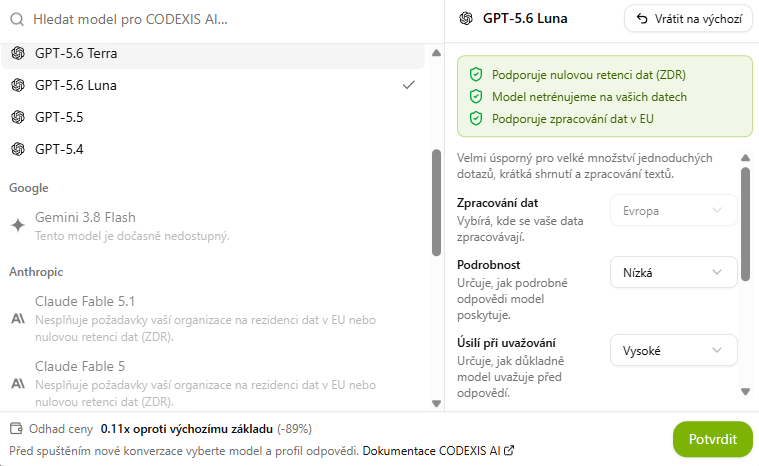
OpenAI's GPT models meet both requirements. Zero data retention and EU processing are agreed with OpenAI by contract; see the Security page for details. You can see which models meet the requirements directly in the model picker: each model's detail lists its guarantees.
Turning the requirements on for a license
- Open the Credit Management application, pick the license in the license list and go to the License settings tab.
- Turn on Require EU data processing, Require zero data retention (ZDR), or both.
- Click Save settings.
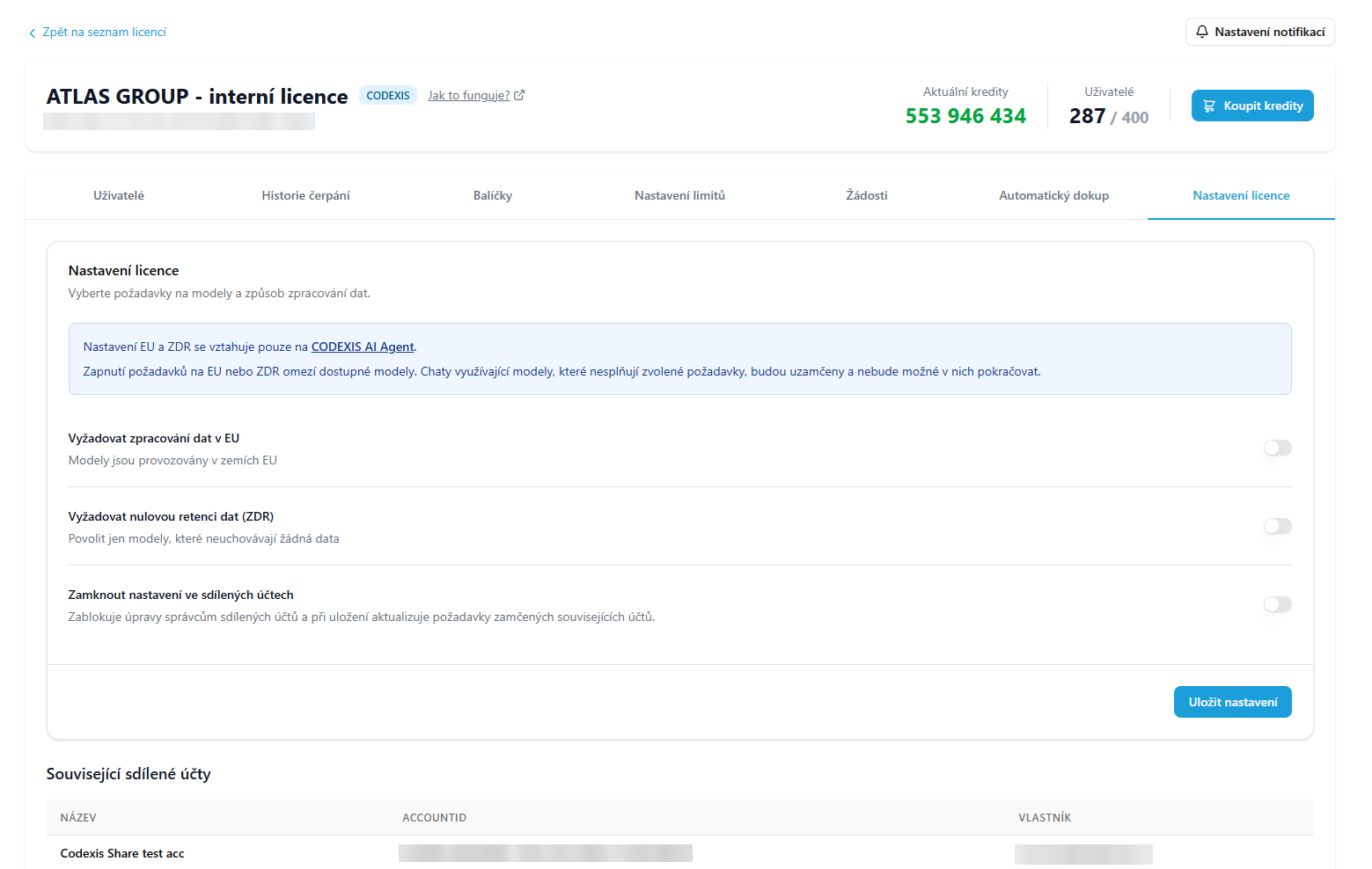
The settings apply to every user of the license. Turn a requirement off the same way.
Restricted models and locked conversations
Turning a requirement on restricts the models available to every user of the license. Conversations running on a model that does not meet the chosen requirements are locked and cannot be continued.
Shared credit accounts
A shared credit account has its own model requirements, managed by the account's administrator. The Lock settings in shared accounts toggle blocks their changes, and on save the license requirements are written to every locked related account. The related shared accounts, with name and owner, are listed below the settings. Shared accounts are described on the Shared credit account page.
What changes for users
Model picker
Only models that meet the chosen requirements stay active in the model picker. The others are greyed out with the note Does not meet your organization's requirements for EU data residency or zero data retention (ZDR) and cannot be selected. A model's detail shows its guarantees: Supports zero data retention (ZDR), We do not train on your data and Supports EU data processing.
When the license requires EU data processing, the Data processing option in the response profile is fixed to Europe and cannot be changed.
Locked conversations
Conversations running on a model that does not meet the requirements are locked once the settings are saved and cannot be continued. Start a new conversation on the same topic with one of the models that meet the requirements.
Next steps
The model picker and response profile are described in the Conversation chapter. The other tabs of Credit Management are on the Credit Management page, and OpenAI data processing terms on the Security page.
12. Assistants
An assistant is an AI helper focused on one area, with its own instructions, model and jurisdiction. You create it by describing it in plain language, edit it in a form or with AI, and can add the Case law research workflow.
Integrations
Guides to connecting CODEXIS AI Agent to email, Microsoft 365 applications and your own tools through the API.