

Add-ons
Add-ons extend CODEXIS AI with additional features and data sources, legal databases, registers, document-handling tools, and community extensions.
What it is: Add-ons extend CODEXIS AI with additional features and data sources — legal databases, registers, document-handling tools, and community extensions. Everything is in one place; you just need to turn it on.
Where to find it: In the left menu under Tools → Add-ons.
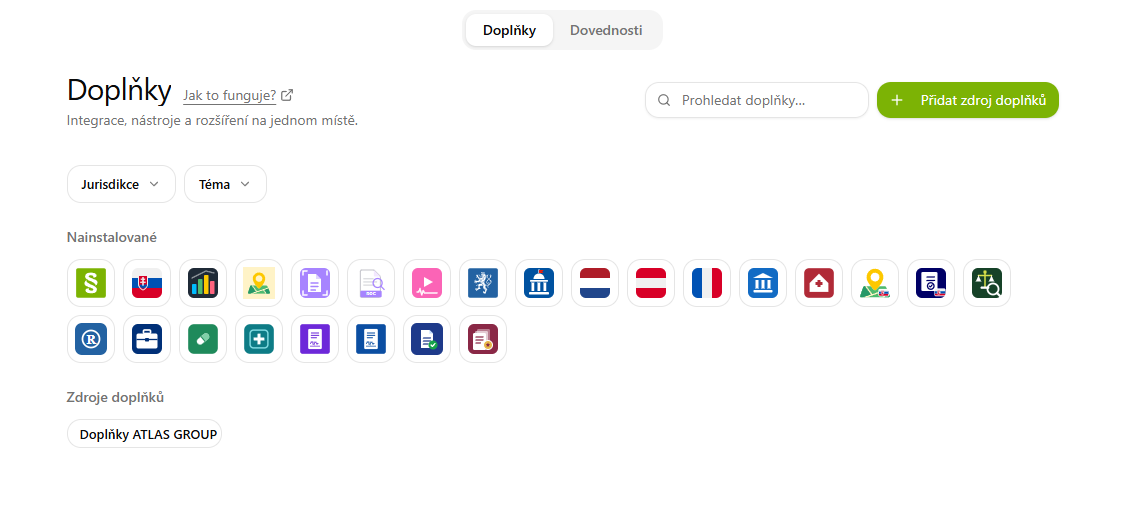
Working with the overview
- Search add-ons — a search box in the top right for quickly finding a specific add-on.
- Each add-on has its own tile with a name, description, and the number of the latest version.
- The button on the tile shows the status:
- Installed — the add-on is active and ready to use.
- Uninstall — you can disable/remove the add-on.
- The icons on the right next to an add-on group are used to refresh the list and remove the source.
Adding an add-on source
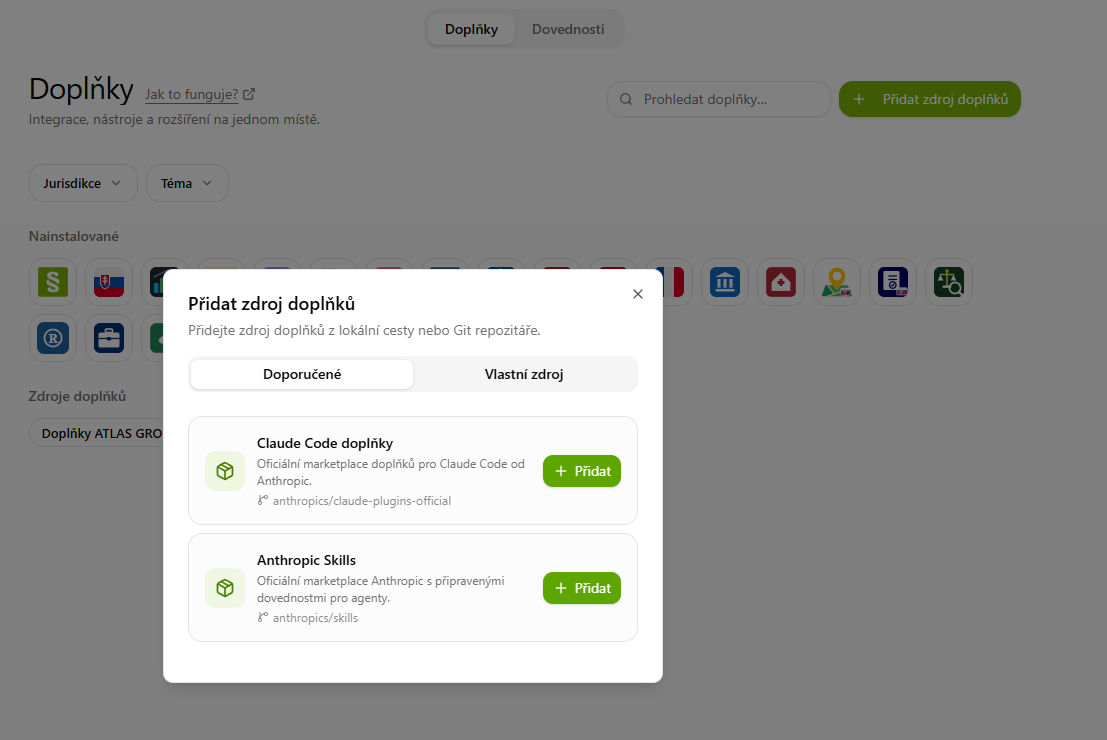
You add new add-ons with the + Add add-on source button (top right). A dialog with two tabs opens.
Recommended
Ready-made sources you can add with a single click — e.g. Claude Code plugins (Anthropic's official marketplace) or Anthropic Skills (ready-made skills for agents). Click + Add next to the source you want.
Custom source
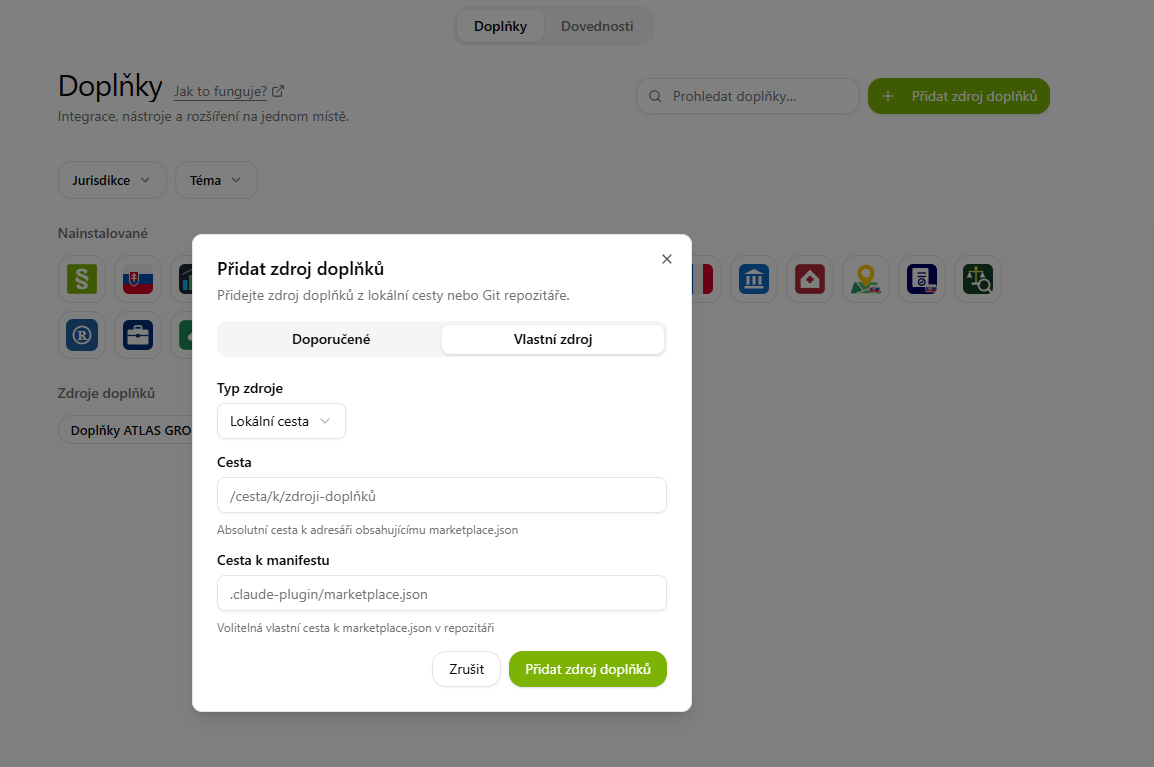
Add add-ons from your own local path or a Git repository — depending on the chosen Source type:
- Local path — the Path to a directory containing
marketplace.json(an absolute path) and an optional Manifest path.
- Git repository — the Repository URL (HTTPS or SSH), an optional Branch/Tag (default
main) and an optional Manifest path.
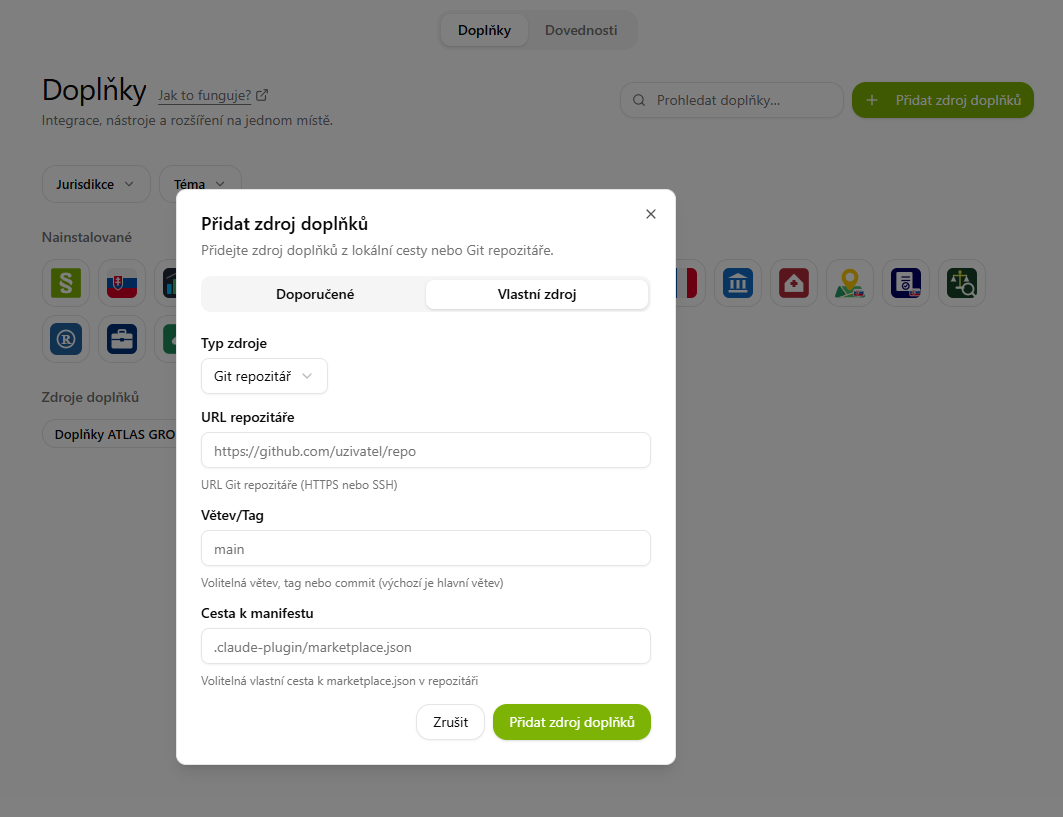
Confirm the details with the Add add-on source button.
💡 Adding your own sources is more for advanced users/IT. A regular user will get by with the add-ons that are already available.
How add-ons work
Most add-ons are operated in exactly the same way — you ask in a normal conversation and the add-on activates itself based on your query. The answer always draws on a verified source and includes a link you can check. There is no need to learn any commands or switch between applications.
In addition, some add-ons add their own skills, apps (continuous monitoring), or specialized agents — you will then find these in the corresponding Skills, Apps, and Agents sections.
What is available
The selection of add-ons is continuously growing, so you will always find the most up-to-date and complete list directly in the Tools → Add-ons overview. Add-ons are currently available in these areas:
- Czech law — CODEXIS — Legal database (the flagship add-on: legislation, case law, commentaries, templates), Municipal regulations of the Czech Republic, Chamber of Deputies of the Czech Republic.
- Foreign and European law — Slovakia, Austria, the Netherlands, as well as EU law and case law.
- Registers and registries — ARES (Czech companies and sole traders), Slovak Business Register, Czech Cadastre of Real Estate, Slovak Cadastre of Real Estate, Czech Insolvency Register (ISIR).
- Working with documents and data — Document OCR, Video and audio analysis, Data visualization, French open data.
💡 The flagship add-on is CODEXIS — Legal database, which brings the most extensive Czech legal database — legislation, case law, commentaries, and templates — directly into the conversation, always with a link to the source.
Creating a Plugin
This guide explains how to build a plugin for CODEXIS AI Agent and publish it so anyone can install it. It covers the files you write, the manifest fields you set, and the lifecycle hooks and environment variables the platform gives you.
The official marketplace is the best source
of working examples. You won't add your plugin there (you publish your own, see below), but it
makes a great reference: ares
is the simplest "skill + one tool" plugin and
codexis is the most
complete.
A plugin is a folder under plugins/<name>/. It can contain any mix of skills (Markdown that
tells the AI when and how to do something; the core of most plugins), command-line tools
(small prebuilt programs the AI runs, shipped in bin/), lifecycle hooks (commands run on
install/update/uninstall), components (embedded web dashboards), and automations (scheduled
jobs). The smallest valid plugin is a plugin.json plus one SKILL.md; everything else is opt-in.
How plugins are distributed: your own marketplace
Plugins are always installed from a marketplace, a git repository that lists one or more plugins. There is no standalone, single-plugin install: even a single plugin ships as a marketplace with one entry.
You do not add your plugin to the official marketplace. You publish your own: a git repo
containing a .claude-plugin/marketplace.json and a plugins/ folder.
your-marketplace-repo/
├── .claude-plugin/
│   └── marketplace.json     # lists your plugin(s)
└── plugins/
    └── your-plugin/         # the plugin itself (everything else in this guide)
Anyone can install it by adding your repository as a marketplace in CODEXIS: choosing a Git source, pasting the repository URL (optionally a branch or tag), then installing any plugin it lists. This needs no admin rights and no involvement from us; each user points CODEXIS at the repositories they trust.
Use a public repository
Private repositories with managed credentials are not supported; publish to a public git host. Updates are picked up when you push and the user refreshes the marketplace.
The rest of this guide describes the files inside plugins/<name>/ in your own repo.
Plugin format and supported components
CODEXIS plugins use the standard Claude Code plugin format: a .claude-plugin/plugin.json
manifest at the plugin root, with component files in conventional directories beside it. Follow these
conventions:
- Markdown + YAML frontmatter for skill and agent definitions (JSON for hooks and MCP).
- Lowercase, hyphen-separated names (kebab-case), no spaces, for the plugin and every component.
- For skills and agents, the
descriptionis written for the model: it is what the AI reads to decide when to use them. Make it specific and dense with trigger words and phrases. - Keep
SKILL.mdshort. Move the details into reference files the AI loads only when needed. - Use
${PLUGIN_DIR}to reference your own files from hooks (this platform's equivalent of Claude Code's${CLAUDE_PLUGIN_ROOT}).
Not every Claude Code component type is loaded by this platform. What CODEXIS AI Agent actually reads:
| Component | Location | Supported |
|---|---|---|
| Skills | skills/<name>/SKILL.md | Yes, the primary component |
| Subagents | agents/<name>.md | Yes |
| Event hooks | hooks/hooks.json | Yes, SessionStart, Stop, PreToolUse, PostToolUse, PreCompact only |
| MCP servers | .mcp.json (mcpServers) | Yes (stdio / SSE / HTTP) |
| Slash commands | commands/*.md | No, not loaded; don't ship these |
Slash commands are not supported
A commands/ folder is copied to disk but never read. Don't rely on it; expose user actions as
automations or as a command-line tool instead.
On top of the standard format, the platform adds lifecycle hooks
(postInstall / postUninstall / onUpdate), a plugin-owned env block, host-injected
CODEXIS_USER_* / CODEXIS_PUBLIC_* variables, trilingual i18n metadata, embedded
dashboards described by component.json, and scheduled automations. Each is covered below.
Most plugins need only skills (plus a command-line tool in bin/). Agents, event hooks, and MCP
servers are there when you need them.
The runtime your plugin gets
When a user installs your plugin, its folder is copied into that user's private Linux sandbox and your install hook runs there. Every command the AI later runs through your plugin runs in the same sandbox. The contract you can rely on:
- It is Linux. Your binaries must be Linux builds for the sandbox architecture (amd64 or arm64).
~/.local/binis first onPATHand writable. Drop a tool there and the AI can call it by name, no full path, nosudo.- Hooks run in a real shell with the working directory set to your plugin folder, a
5-minute timeout, and
$PLUGIN_DIRpointing at that folder. - The
CODEXIS_*environment variables (see below) are available. - Outbound network access may be restricted. Administrators can limit the sandbox to approved destinations, so a tool that calls an external API may need its host allow-listed. Don't assume open internet access.
- The home directory is shared storage (mounted over NFS), and selected folders from the user's
machine or company file server are synced in. Your tools can read them as ordinary paths under
$HOME.
Hook failure rules: a failing postInstall aborts the install; a failing postUninstall or
onUpdate is logged but does not block the operation. A blank hook is a no-op.
Quick start: a skill-only plugin
The smallest useful plugin teaches the AI a workflow and ships no program. Three files:
plugins/hello-law/
├── .claude-plugin/
│   └── plugin.json
└── skills/
    └── hello-law/
└── SKILL.mdplugins/hello-law/.claude-plugin/plugin.json:
{
  "name": "hello-law",
  "version": "1.0.0",
  "description": "Example plugin that explains how to greet a legal question.",
  "author": { "name": "Your Name", "email": "you@example.com" },
  "keywords": ["example"],
  "license": "PROPRIETARY",
  "tags": ["example"],
  "i18n": {
    "cs": { "displayName": "Hello Law", "description": "Ukázkový plugin.", "tagLabels": { "example": "Ukázka" } },
    "en": { "displayName": "Hello Law", "description": "Example plugin.",  "tagLabels": { "example": "Example" } },
    "sk": { "displayName": "Hello Law", "description": "Ukážkový plugin.", "tagLabels": { "example": "Ukážka" } }
  },
  "skills": "./skills"
}plugins/hello-law/skills/hello-law/SKILL.md:
---
uuid: 00000000-0000-0000-0000-000000000001
name: hello-law
description: Use when the user asks to test the hello-law example plugin or says "hello law".
version: 1.0.0
i18n:
  cs: { displayName: "Hello Law", summary: "Ukázková dovednost." }
  en: { displayName: "Hello Law", summary: "Example skill." }
  sk: { displayName: "Hello Law", summary: "Ukážková zručnosť." }
---

# Hello Law

When the user asks you to "test hello law", confirm the example plugin is working. Do not call any
external tools.
Then register it in your .claude-plugin/marketplace.json (see below). That's a complete,
installable plugin.
UUIDs
Every manifest and skill carries a uuid, a permanent unique id. Generate one with uuidgen and
use a distinct value per plugin, per skill, and per marketplace entry.
Plugin folder layout
Only .claude-plugin/plugin.json is required; everything else is opt-in. This is the layout of
codexis, the most
complete plugin:
plugins/<name>/
├── .claude-plugin/
│   └── plugin.json          # REQUIRED: the manifest
├── icon.svg                 # marketplace icon
├── README.md                # human-facing description
├── skills/                  # one folder per skill
│   └── <skill>/
│       ├── SKILL.md
│       ├── icon.svg         # optional
│       └── references/      # optional docs loaded on demand
├── agents/                  # optional subagents (one .md per agent)
├── bin/                     # prebuilt tools (committed)
├── hooks/                   # install / uninstall scripts (+ optional hooks.json event hooks)
├── .mcp.json                # optional MCP server definitions
├── lib/                     # shared library code your tools/components import
├── components/              # embedded web dashboards (advanced)
└── automations/             # scheduled jobs
Complexity tiers, by example: skills only
(visualization)
is just plugin.json + skills/; skill + one tool
(ares) adds bin/,
hooks/, and lifecycle hooks; everything
(codexis) adds
components/, automations/, and lib/.
Plugins ship in built form
A tool ships as a prebuilt binary committed under bin/; a component ships as its built front-end.
How you produce those artifacts (compiler, bundler) is up to you and lives in your own source repo;
only the built output goes into the plugin folder.
The two manifests
.claude-plugin/marketplace.json (your marketplace repo root)
The manifest of your own marketplace. List each plugin in the plugins array. The manifest is
permissive: name and uuid are derived automatically when omitted, and plugins are also
auto-discovered from the plugins/ folder, but we recommend listing each plugin explicitly, i18n
included:
{
  "uuid": "GENERATE-A-NEW-UUID",
  "name": "your-plugin",
  "description": "One-line English description.",
  "source": "./plugins/your-plugin",
  "category": "legal",
  "i18n": {
    "cs": { "displayName": "Český název", "description": "Český popis.", "tagLabels": { "legal": "Právo" } },
    "en": { "displayName": "English name", "description": "English description.", "tagLabels": { "legal": "Law" } },
    "sk": { "displayName": "Slovenský názov", "description": "Slovenský popis.", "tagLabels": { "legal": "Právo" } }
  }
}namemust match thenameinplugin.jsonand the folder insource.sourceis always./plugins/<name>.categoryplaces the plugin in a category. Existing categories:legal,visualization,document-processing,media,open-data.tagLabelslocalizes the tag keys declared in thetagsfield ofplugin.json.
plugins/<name>/.claude-plugin/plugin.json
Describes your plugin. name, version, and description are required; add the rest as needed:
{
  "name": "your-plugin",
  "version": "1.0.0",
  "description": "English description used for discovery.",
  "author": { "name": "Your Name", "email": "you@example.com" },
  "keywords": ["search", "terms"],
  "license": "PROPRIETARY",
  "tags": ["legal", "czech"],
  "i18n": {
    "cs": { "displayName": "...", "description": "...", "tagLabels": { "legal": "Právo", "czech": "Česko" } },
    "en": { "displayName": "...", "description": "...", "tagLabels": { "legal": "Law",   "czech": "Czech Republic" } },
    "sk": { "displayName": "...", "description": "...", "tagLabels": { "legal": "Právo", "czech": "Česko" } }
  },

  "skills": "./skills",
  "components": "./components",

  "env": {
    "CODEXIS_PLUGIN_YOURPLUGIN_API_URL": "https://api.example.com"
  },

  "postInstall":   "bash \"${PLUGIN_DIR}/hooks/install-binaries.sh\"",
  "postUninstall": "bash \"${PLUGIN_DIR}/hooks/uninstall-binaries.sh\"",
  "onUpdate":      "bash \"${PLUGIN_DIR}/hooks/install-binaries.sh\""
}| Field | Required? | Purpose |
|---|---|---|
name, version, description | yes | Identity and discovery. version is MAJOR.MINOR.PATCH. |
author, keywords, license, tags | recommended | Marketplace metadata and search. |
i18n | recommended | Localized display strings (see Translations). |
skills | if shipping skills | Always "./skills". |
components | optional | "./components" if shipping dashboards. |
env | optional | Plugin config variables (see Environment variables). |
postInstall / postUninstall / onUpdate | if shipping a tool | Lifecycle hooks (see below). |
Writing a SKILL.md
A skill is a Markdown file: a frontmatter block (between --- lines) followed by instructions
written for the AI.
---
uuid: 214caaa4-3728-4d21-b379-ab4b376b7615
name: ares
description: Use for company / sole-trader lookups by IČO or name. Triggers on "ares", "ičo", "obchodní rejstřík", "živnostenský rejstřík", "plátce DPH", "vyhledej firmu", "kdo je jednatel".
version: 0.1.0
i18n:
  cs: { displayName: "ARES - registr ekonomických subjektů", summary: "Vyhledávání firem a OSVČ v ARES." }
  en: { displayName: "ARES - Czech Business Registry", summary: "Look up companies and sole traders in ARES." }
  sk: { displayName: "ARES - register ekonomických subjektov", summary: "Vyhľadávanie firiem a SZČO v ARES." }
---

# ARES - Czech Business Registry

A single tool, `ares-cli`, wraps the ARES public REST API. Assume it is installed and on `PATH`.
Do NOT call `curl` or any other tool directly.

## Commands
...
description is the field that matters most. It is not shown to users; it is what the AI reads to
decide when to load the skill. Write it as an instruction packed with trigger words and phrases,
not as a vague summary.
The body is the playbook: which tool to call, the exact command syntax, how to parse the output, and what to show the user. Be prescriptive: give example commands and a decision tree.
| Frontmatter field | Required? | Purpose |
|---|---|---|
uuid | yes | Permanent unique id. |
name | yes | Lowercase-hyphenated; matches the folder name. |
description | yes | AI trigger text. Never translated. |
version | recommended | Semantic version. |
i18n | recommended | displayName + summary per language, shown in the UI skills list. |
allowed-tools | optional | Restricts the skill to specific tools, e.g. allowed-tools: shell. |
Keep SKILL.md focused. Put the long details in skills/<name>/references/*.md and have the skill
point the AI there only when needed.
Shipping a tool: bin/ and lifecycle hooks
If your plugin runs a command-line tool, you ship it as a prebuilt binary and install it onto the
sandbox's PATH with a lifecycle hook.
The binary
Commit a self-contained Linux executable at plugins/<name>/bin/<tool>. Any language that compiles
to a static Linux binary works; existing plugins use Rust. The tool reads its inputs and prints
results (ideally JSON) to stdout.
Installing it onto PATH
An install hook has just one job: copy your binary into ~/.local/bin, which is already on
PATH. For a single binary you don't even need a script; inline the commands in plugin.json (this
is what the ocr plugin does). ${PLUGIN_DIR} resolves to your installed plugin folder:
  "postInstall":   "sudo install -m 0755 \"${PLUGIN_DIR}/bin/my-tool\" \"${HOME}/.local/bin/my-tool\"",
  "postUninstall": "sudo rm -f \"${HOME}/.local/bin/my-tool\"",
  "onUpdate":      "sudo install -m 0755 \"${PLUGIN_DIR}/bin/my-tool\" \"${HOME}/.local/bin/my-tool\""
That's the whole mechanism. The platform only cares that your tool ends up on PATH.
Copy the ares plugin
If you ship several binaries (or copy support files as well), move the same steps into a small
hooks/install-binaries.sh / hooks/uninstall-binaries.sh pair and point the hooks at them. The
cleanest example to copy is
plugins/ares/hooks.
Its script installs one binary; to adapt it, change a single line: the binary name.
The three lifecycle hooks
| Hook | Runs | On failure |
|---|---|---|
postInstall | after install | aborts the install |
onUpdate | after an update to a new version | logged, non-fatal |
postUninstall | after removal | logged, non-fatal |
onUpdate normally just repeats postInstall. Use ${PLUGIN_DIR} to reference your plugin's files;
it is this platform's equivalent of Claude Code's ${CLAUDE_PLUGIN_ROOT}.
Environment variables
Your hooks and every command the AI runs see three families of variables.
CODEXIS_PLUGIN_* (you declare these)
Your plugin's own non-secret config (URLs, IDs), declared in the env block of plugin.json:
  "env": {
    "CODEXIS_PLUGIN_YOURPLUGIN_API_URL": "https://api.example.com"
  }
Prefix the name with CODEXIS_PLUGIN_ and make the rest unique to your plugin so it never collides
with another plugin's variable. No secrets here; the value lives in the manifest. Declare config in
env; don't write .env files or use export inside hooks.
CODEXIS_USER_* (injected secrets, read-only)
Per-user secrets the platform provides. Read them; never log them or bake them into a binary.
| Variable | What it is |
|---|---|
CODEXIS_USER_API_TOKEN | The user's Codexis authorization token (when available). |
CODEXIS_USER_LITELLM_API_KEY | Per-user key for the AI gateway. |
CODEXIS_PUBLIC_* (injected context, read-only)
Non-secret runtime context.
| Variable | What it is |
|---|---|
CODEXIS_PUBLIC_DAEMON_URL | Backend GraphQL endpoint. |
CODEXIS_PUBLIC_USER_HOME | The user's home directory. |
CODEXIS_PUBLIC_LITELLM_BASE_URL | AI gateway base URL. |
CODEXIS_PUBLIC_SESSION_ID | Current chat session id (only during a chat). |
CODEXIS_PUBLIC_TOOL_CALL_ID | Current tool-call id (only during a chat). |
CODEXIS_PUBLIC_AUTOMATION, …_AUTOMATION_ID, …_AUTOMATION_RUN_ID, …_AUTOMATION_TRIGGER | Set when running inside a scheduled automation. |
Install/uninstall/update hooks run outside a chat, so they get the platform URL, user home, and
secrets, but not SESSION_ID / TOOL_CALL_ID.
Translations (i18n)
The UI is available in Czech (cs), English (en), and Slovak (sk). Every manifest and skill
carries an i18n block.
- Technical identifiers (
name,id, tag keys) are never translated. - A skill's
descriptionis never translated; it's the AI trigger, not UI text. - Only display strings are translated:
displayName, the manifestdescription, the skillsummary, andtagLabels.
JSON manifests:
"i18n": {
  "cs": { "displayName": "...", "description": "...", "tagLabels": { "legal": "Právo" } },
  "en": { "displayName": "...", "description": "...", "tagLabels": { "legal": "Law" } },
  "sk": { "displayName": "...", "description": "...", "tagLabels": { "legal": "Právo" } }
}
SKILL.md frontmatter (note summary, not description):
i18n:
  cs: { displayName: "...", summary: "..." }
  en: { displayName: "...", summary: "..." }
  sk: { displayName: "...", summary: "..." }
Missing translations fall back in the order requested language → en → the untranslated name/description.
Fill in en at minimum; cs and sk are strongly recommended.
Optional: subagents, event hooks, MCP, components, automations
Subagents (agents/<name>.md)
A subagent is a specialized assistant the AI can delegate work to. Ship one as a Markdown file
under agents/, with frontmatter plus a system-prompt body:
---
name: contract-reviewer
description: Use to review a contract draft for missing clauses and risky terms.
tools: Read, Grep
model: sonnet
---

You are a contract reviewer. Analyze the provided draft for missing standard clauses, ambiguous
terms, and one-sided liability. Report findings as a prioritized list.
As with skills, description is the model-facing trigger. name is lowercase with hyphens. The
agents/ folder is discovered automatically; no manifest key is needed.
Event hooks (hooks/hooks.json)
Event hooks run a command automatically on chat events (unlike the lifecycle hooks above, which run
at install time). Put them in hooks/hooks.json:
{
  "hooks": {
    "PreToolUse": [
      {
        "matcher": "shell",
        "hooks": [
          { "type": "command", "command": "bash \"${PLUGIN_DIR}/hooks/guard.sh\"", "timeout": 30 }
        ]
      }
    ]
  }
}
matcher is a regex matched against the tool name; the hook command receives a JSON payload on
stdin and runs in the sandbox. This platform supports only these five events: SessionStart,
Stop, PreToolUse, PostToolUse, PreCompact.
MCP servers (.mcp.json)
To expose external tools through the Model Context Protocol, ship an .mcp.json (or
.claude-plugin/.mcp.json) with an mcpServers map:
{
  "mcpServers": {
    "my-server": {
      "command": "${PLUGIN_DIR}/bin/my-mcp-server",
      "args": ["--stdio"]
    }
  }
}
The stdio (a process spawned in the sandbox), SSE, and streamable HTTP transports are all
supported; the server's tools appear in the AI's toolkit automatically. A server that fails to
start degrades gracefully to an "unavailable" notice rather than breaking the chat.
Components: embedded web dashboards
A component is a web app shown inside the product UI. Declare "components": "./components", give
each component a components/<name>/component.json, and ship the built front-end (index.html,
assets/, locales/) plus an optional backing script:
{
  "id": "katastr",
  "title": "Katastr - Sledovaná řízení",
  "icon": "assets/icon.png",
  "route": "katastr",
  "description": "Track the status of cadastral proceedings.",
  "entrypoint": "index.html",
  "binary": "katastr.py",
  "i18n": {
    "cs": { "displayName": "Katastr - sledovaná řízení", "description": "..." },
    "en": { "displayName": "Cadastre - Tracked Proceedings", "description": "..." },
    "sk": { "displayName": "Kataster - sledované konania", "description": "..." }
  }
}
Automations: scheduled jobs
An automation is a Markdown file in automations/ that contains only frontmatter:
---
uuid: b7c2f1a0-4e3d-4a6b-9c8e-2f5a1d0b6e74
type: COMMAND
title: Sync Codexis 1.0
description: Import your chats, agents and files from Codexis 1.0.
command: cdxctl codexis sync
cron: 0 3 * * *
enabled: true
---
command runs on the cron schedule (here, daily at 03:00).
References: on-demand skill docs
Extra Markdown files under skills/<name>/references/. Keep SKILL.md short and have it point the
AI at a reference file only when needed (e.g. "For the full workflow, read
references/czech-law-change-assessment.md").
Checklist
- You have your own git repo with a
.claude-plugin/marketplace.jsonand aplugins/folder. - The plugin folder is
plugins/<name>/, with<name>lowercase-hyphenated. plugin.jsonhasname,version, anddescription;namematches both the folder and themarketplace.jsonentry.- The plugin has a
marketplace.jsonentry with a freshly generateduuid. - Each skill has its own
SKILL.mdwith a uniqueuuid, aname, and a keyword-richdescription. - If you ship a tool: the prebuilt Linux binary is committed at
bin/<tool>, the hooks are wired up inplugin.json, and the binary is installed into~/.local/bin. - Config lives in
envasCODEXIS_PLUGIN_*variables; secrets are read fromCODEXIS_USER_*, never hard-coded. i18nis filled in (enat minimum;csandskpreferred).- Everything is committed and pushed to a public git host; users install by adding the repo URL as a Git marketplace.
8. Automation
Automation lets you schedule CODEXIS AI to perform a given task regularly on its own, for example, to check the documents in a folder every morning and alert you to any problems.
10. Skills
A skill is a set of instructions (procedures) that CODEXIS AI learns and can then use in any conversation.